Guide
How to Build a Brand Perception Survey (Free Template)
A brand perception survey tells you how people actually feel about your brand, not just whether they would buy again. Most survey tools stop at collecting answers. A scored brand perception survey goes further: it turns each response into a sentiment score, sorts respondents into promoters, passives, and detractors, and triggers a different next step for each group automatically. Here is how to build one.
Quick answer
How do you build a brand perception survey?
Pick 3-5 perception dimensions (trust, quality, value, service), write scored multiple-choice questions for each, set sentiment tiers such as Detractor, Passive, and Promoter, and trigger a different action per tier. With FluoTest you can build and publish one free in minutes, with an email and optional Slack alert on every submission.
What Is a Brand Perception Survey?
A brand perception survey measures how your audience perceives your brand across dimensions like trust, quality, value, and likelihood to recommend. Instead of a single satisfaction number, it captures the story behind the number: what is driving a positive or negative impression.
A scored version adds a layer most surveys skip: each answer contributes points toward a total, and that total places the respondent into a sentiment tier. This turns a passive feedback form into an active segmentation tool you can act on immediately.
Why Use FluoTest to Build It?
FluoTest is a free quiz builder built for scored assessments. You assign point values to each answer, define sentiment tiers such as Detractor, Passive, and Promoter, and set a different action per tier: alert your team, request a review, or offer a fix.
Every submission triggers an email with the respondent's score and full answer breakdown, so nothing slips through. You can also connect Brevo to auto-sync respondents with their sentiment score, use webhooks for Zapier, Make, or n8n to push detractor alerts straight into Slack, add Meta Pixel or GTM tracking, and see per-question drop-off analytics.
Try it: fluotest.com
How to Build a Brand Perception Survey in 6 Steps
1. Pick your perception dimensions
Choose 3-5 things you want to measure: trust, quality, value for money, customer service, likelihood to recommend. Each becomes one or two questions. Keep the list short so the survey stays focused and finishes in under two minutes.
2. Write scored questions
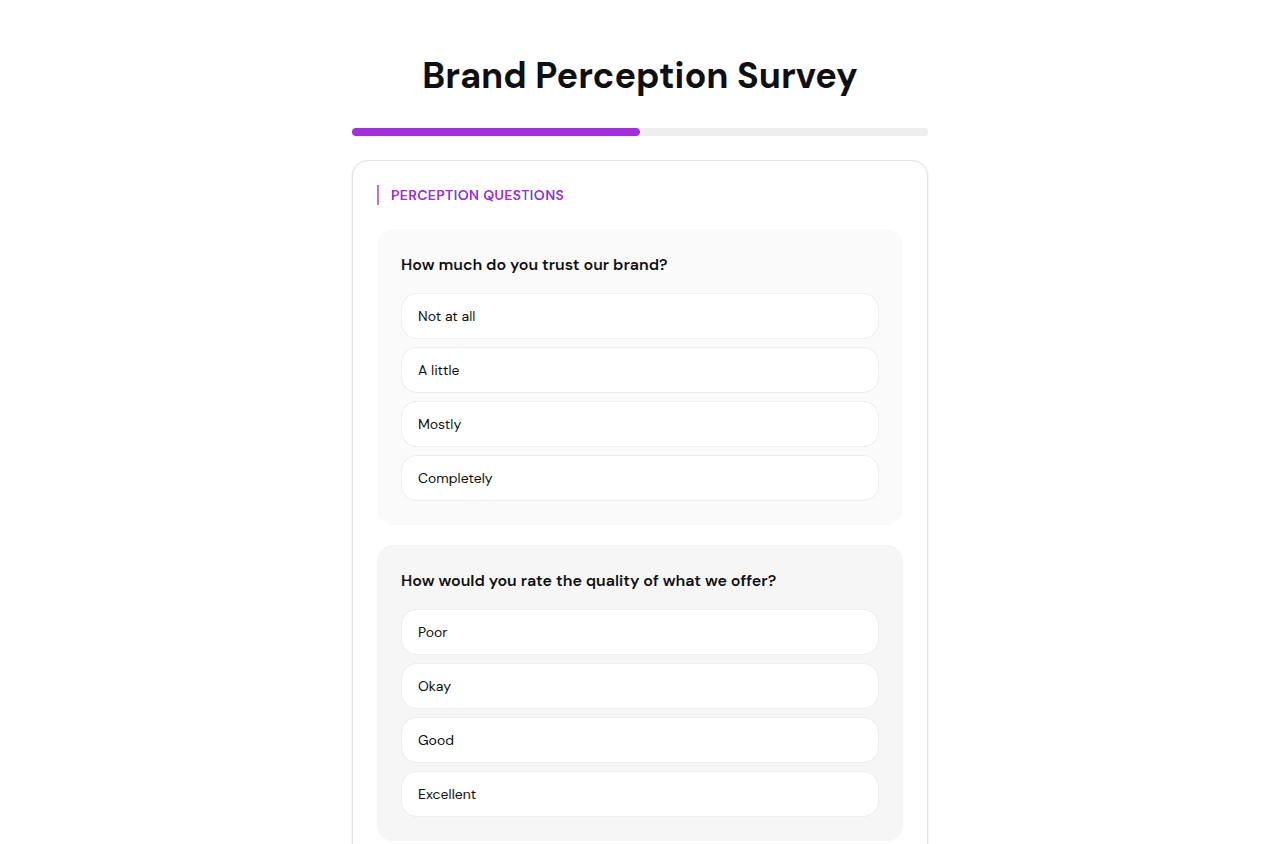
Turn each dimension into a multiple choice question with answers on a scale of agreement or satisfaction. Give each answer a point value: strongly negative answers score low, strongly positive answers score high.
3. Define your sentiment tiers
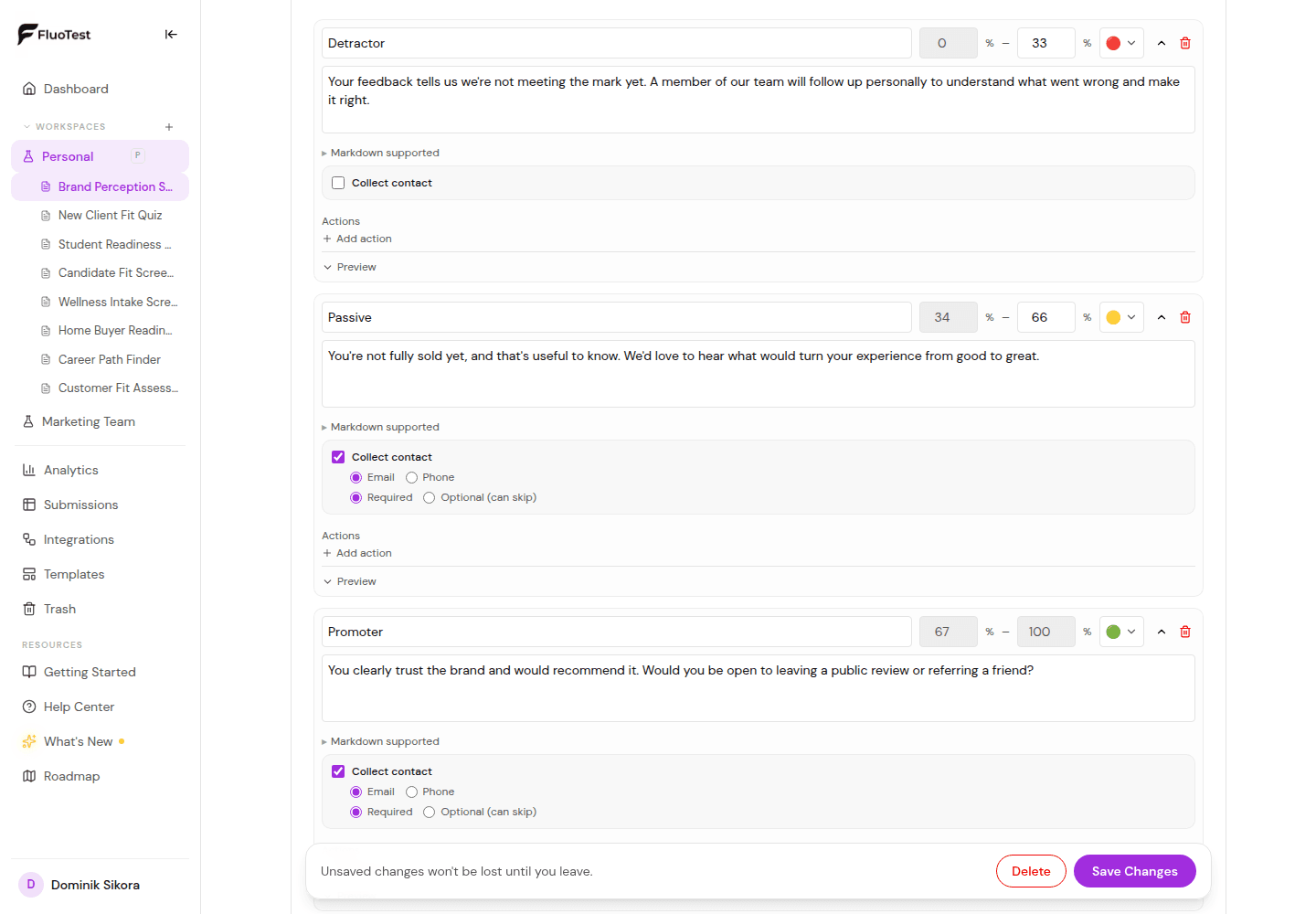
Set score ranges that map to Detractor, Passive, and Promoter, or use your own labels. In FluoTest this happens in the score tiers editor, no separate NPS spreadsheet or calculation required.
4. Assign an action per tier
Detractor: alert your team and offer to make it right. Passive: send a follow-up asking what would make them a 10. Promoter: ask for a public review or referral. FluoTest triggers the right action automatically based on score.
5. Write result copy for each tier
Show respondents a short message after they submit. Thank promoters, acknowledge detractors without being defensive, and give passives a reason to engage further.
6. Publish and connect your tools
Embed the survey on your site, share it after a purchase or support ticket, or email it to your list. Connect Brevo to sync sentiment scores to contacts, or use a webhook to push detractor responses straight into Slack for same-day follow-up.
Why a Scored Brand Perception Survey Works Better Than a Plain Feedback Form
- -It turns vague feedback into a number you can track over time
- -Detractors get flagged and routed to your team automatically, before they churn or leave a bad review
- -Promoters get identified in real time, right when they are most likely to leave a review or refer someone
- -You see which perception dimension, trust, value, or service, is dragging your score down
- -It runs continuously with no manual tagging or spreadsheet sorting
- -Drop-off analytics show which question respondents abandon, so you can fix it
- -Brevo integration lets you trigger different email sequences per sentiment tier automatically
Who Should Build a Brand Perception Survey?
- -Marketing teams tracking brand health over time
- -Customer success teams that want to catch unhappy customers before they churn
- -Agencies running perception audits for clients
- -E-commerce and service businesses that want more reviews from happy customers
- -Anyone replacing a static NPS form with something that actually triggers follow-up
Frequently Asked Questions
What is the difference between a brand perception survey and an NPS survey?
NPS asks one question: how likely are you to recommend us. A brand perception survey asks several, covering dimensions like trust, quality, and value, and can still calculate an NPS-style score alongside the detail. FluoTest lets you combine both in one scored quiz.
How many questions should a brand perception survey have?
Five to eight is a good range: one or two questions per perception dimension, plus a recommendation question. Longer surveys increase drop-off, which is exactly what the built-in analytics help you catch.
What should happen when someone scores as a Detractor?
Route them to an internal alert, not just a thank-you page. FluoTest lets you set a webhook or email notification per score tier so your team can follow up the same day, before the negative impression hardens.
Can I use this after a purchase or support ticket?
Yes. Embed the survey on a post-purchase thank-you page, or link to it in a follow-up email after a support ticket closes. Timing it close to the interaction gets more accurate, higher-response-rate feedback.
Is FluoTest free to use for a brand perception survey?
Yes. FluoTest is free forever with no submission limits, no quiz limits, and no credit card required.
Ready to build your brand perception survey?
FluoTest is free. No credit card required. Start in 5 minutes.
What you get with FluoTest:
- - Scored quizzes with multiple-choice questions
- - Custom sentiment tiers with a different action per tier
- - Email notifications on every submission
- - Brevo integration: auto-sync respondents with score attributes
- - Webhooks for Zapier, Make, and n8n
- - Meta Pixel & GTM for conversion tracking
- - Per-question drop-off analytics
Questions? Read our pricing page or browse quiz templates.