Guide
Make a Quiz: Start With the Results, Then Build It Free
Most people who want to make a quiz open a builder and start typing questions. That is backwards. The quizzes people finish, and the ones that actually help you, start with the results. This guide shows the order that works: outcomes first, then questions, then scoring, then publishing.
Quick answer
How do you make a quiz that people finish and that gives useful results?
Decide the 3 or 4 results you want people to land on, then write questions that point toward those results, then give each answer a score. In FluoTest you can do all of this for free, with unlimited quizzes and responses, and publish when the results read the way you want.
What it means to make a quiz that sorts people
A trivia quiz checks what someone knows. A scored quiz does something different: it adds up weighted answers and puts each person into a result group. Think of a learning style quiz, a readiness check or a client fit quiz. The person answers a few questions and gets a result that says something about them.
This is why the order of work matters. If you write questions first, you end up with results that feel random. If you write results first, every question has a job: it moves people toward one result or another. That makes the quiz shorter, clearer and easier to fix later.
Why build it in FluoTest
FluoTest is a free scored-quiz builder. You can make unlimited quizzes and collect unlimited responses, use every question type, and set score tiers that route people to different results. You can also score several categories in one quiz, and add conditional branching and custom outcomes when you need them.
Your respondents get welcome and thank-you pages, and you can change the quiz colors, font and base font size to match your brand. Responses can go to Brevo or Zapier, and you can export them as CSV. The free plan keeps the Powered by FluoTest badge on your quiz. Removing it is a Pro feature.
Try it: fluotest.com
How to make a quiz in 6 steps
1. Write down the results first
List the 3 or 4 results you want someone to land on. Give each a short name and one sentence on what it means. For a client fit quiz, that might be ready now, almost ready and not yet.
2. Decide what each result should lead to
For every result, pick the next step: a resource, a booking page, or nothing. This is what score tiers and routing are for. Knowing the next step now keeps the quiz honest.
3. Write questions that point toward results
Write 5 to 10 questions where each answer tells you something real. Cut any question you could not use to separate one result from another. Short quizzes get finished more often than long ones.
4. Give every answer a score
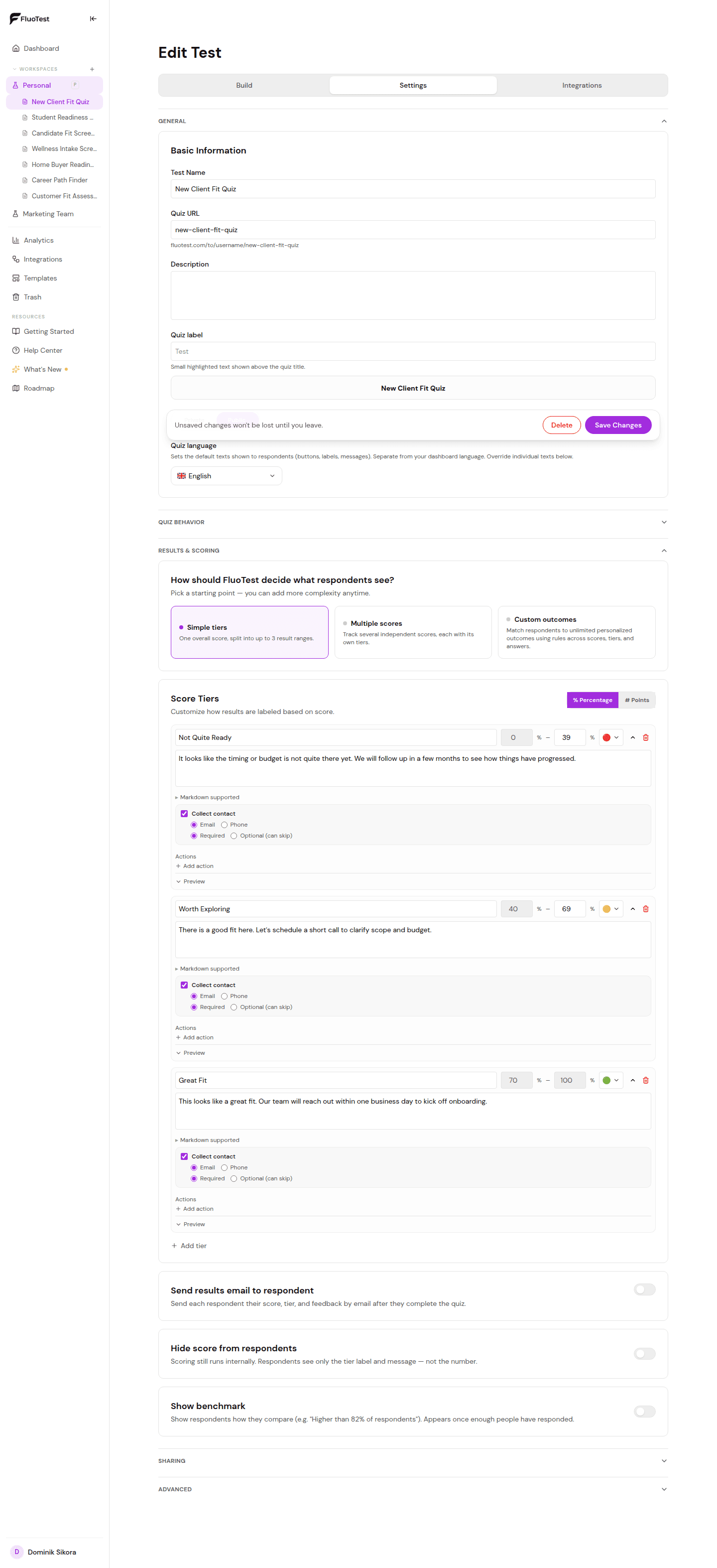
Weight each answer, for example higher for answers that signal a stronger fit. Then set the score ranges that match each result. If you want to score more than one topic, use several score categories in the same quiz.
5. Add the pages around it
Set up a welcome page that says what the quiz is and how long it takes, and a thank-you page that says what happens next. Then match the theme to your site with colors, font and base font size.
6. Test it as a stranger, then publish
Take the quiz several times with different answers and check that every result is reachable and reads well. Fix any result nobody can land on. Then publish, share the link and connect your email tool if you use one.
Try it:
Make a quiz for freeWhy results-first quizzes work better
- -Every question has a purpose, so the quiz stays short.
- -Every result is reachable and written on purpose, not by accident.
- -People get an answer that feels personal, which is why they finish.
- -You know the next step for each result before anyone takes the quiz.
- -Fixing the quiz later is easy because you can trace a result back to its questions.
- -You pay nothing to build it: quizzes and responses are unlimited on the free plan.
Who this approach is for
- -Coaches and consultants who want to sort leads before a discovery call.
- -Service businesses that want a simple way to see who is a good fit.
- -Agencies building quizzes for several clients.
- -Teachers and trainers who want scored assessments, not just right or wrong.
- -Anyone making a first quiz who does not want to rewrite it three times.
Frequently Asked Questions
How do I make a quiz online for free?
Create a quiz in FluoTest, add your questions, give each answer a score and set the score ranges for your results. Unlimited quizzes and responses are free. Publish it and share the link.
How many questions should a quiz have?
Use as many as you need to separate your results, and no more. A good test is to remove a question and see whether any result becomes harder to reach. If not, the question was not doing its job.
Can I make a quiz that gives different results for different scores?
Yes. FluoTest uses score tiers and routing, so each score range shows its own result. You can also use custom outcomes and conditional branching if you want the quiz to react to specific answers.
Can I make a quiz that scores more than one thing?
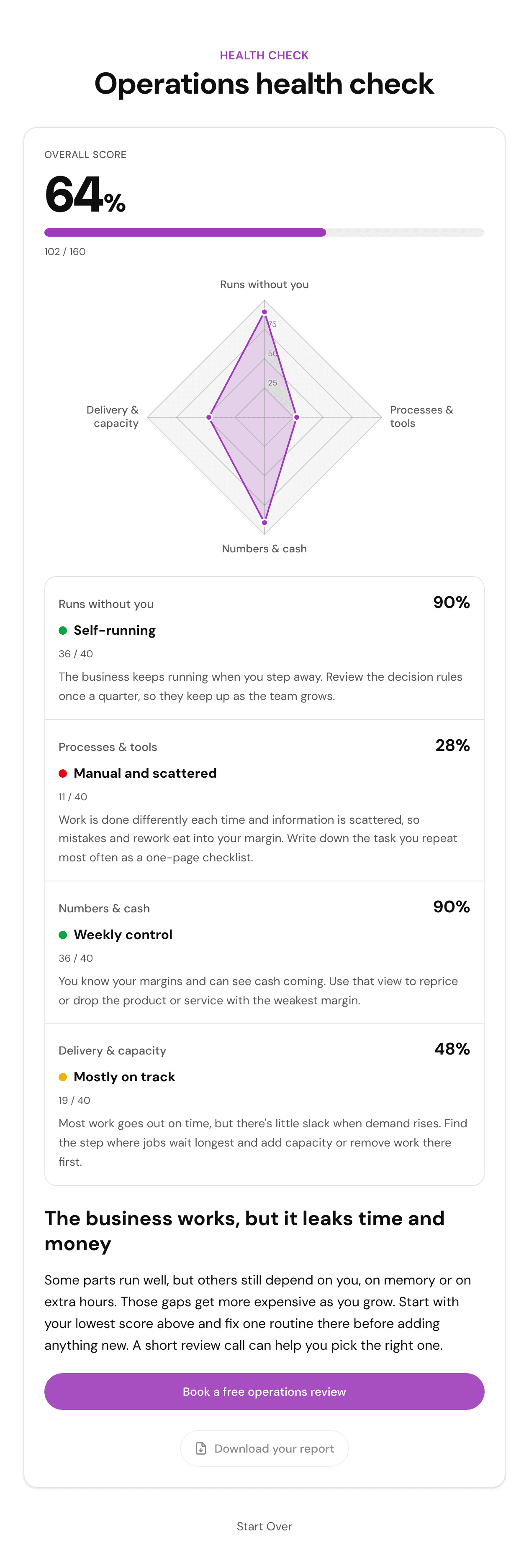
Yes. You can use multiple score categories in one quiz. If you have 3 or more categories, you can also show the results as a radar chart, and that is free too.
Does the free plan put a badge on my quiz?
Yes. The free plan keeps the Powered by FluoTest badge. Removing the badge is a Pro feature, which costs 12 euros a month or 120 euros a year.
Make your quiz free with FluoTest
Plan the results, write the questions, and publish when it reads right.
What you get with FluoTest:
- - Unlimited quizzes and responses
- - All question types
- - Score tiers and routing
- - Multiple score categories
- - Custom outcomes and conditional branching
- - Welcome and thank-you pages
- - CSV export, plus Brevo, Zapier, GTM and Meta Pixel
Questions? Read our pricing page or browse quiz templates.