Guide
How to Use Free Workspaces to Separate Quizzes by Client
If you build quizzes for more than one client, brand or project, a single long list gets messy fast. The quizzes blur together, and so do the leads. FluoTest workspaces fix that, and any account can create them, free plan included. Here is how they work, what stays separate, and what still needs Pro.
Quick answer
Can you create multiple workspaces on the free plan?
Yes. Any FluoTest account can create additional workspaces from the switcher at the bottom of the sidebar. Each one has its own quizzes, folders and contacts, so client work stays apart. Inviting other people into a workspace is still a Pro feature, so on the free plan a workspace is a private space for your own work.
What is a workspace in FluoTest?
A workspace is a separate space inside your account. When you switch into one, the sidebar, Dashboard, Submissions, Contacts and the other pages show only that workspace's quizzes and data. Every account starts with one personal workspace, and you can add more.
A good rule is one workspace per client, brand or project. A new quiz is created in whichever workspace you are working in, and each workspace has its own address, so you can bookmark the ones you use most.
What stays free and what needs Pro
Creating a workspace is free, and so is everything you build inside it: unlimited quizzes and responses, every question type, score tiers, conditional branching, Brevo, Zapier, GTM and Meta Pixel integrations, and CSV export. Free quizzes show a small Powered by FluoTest badge.
Pro covers the collaboration side: inviting teammates by email, giving them View or Edit access to shared quizzes, read-only viewer roles and publish approval. It also removes the badge and the FluoTest branding from respondent emails. Pro belongs to the account that owns a workspace, so every workspace on a free account is a free workspace.
Try it: fluotest.com
How to set up a workspace per client in 5 steps
1. Open the workspace switcher
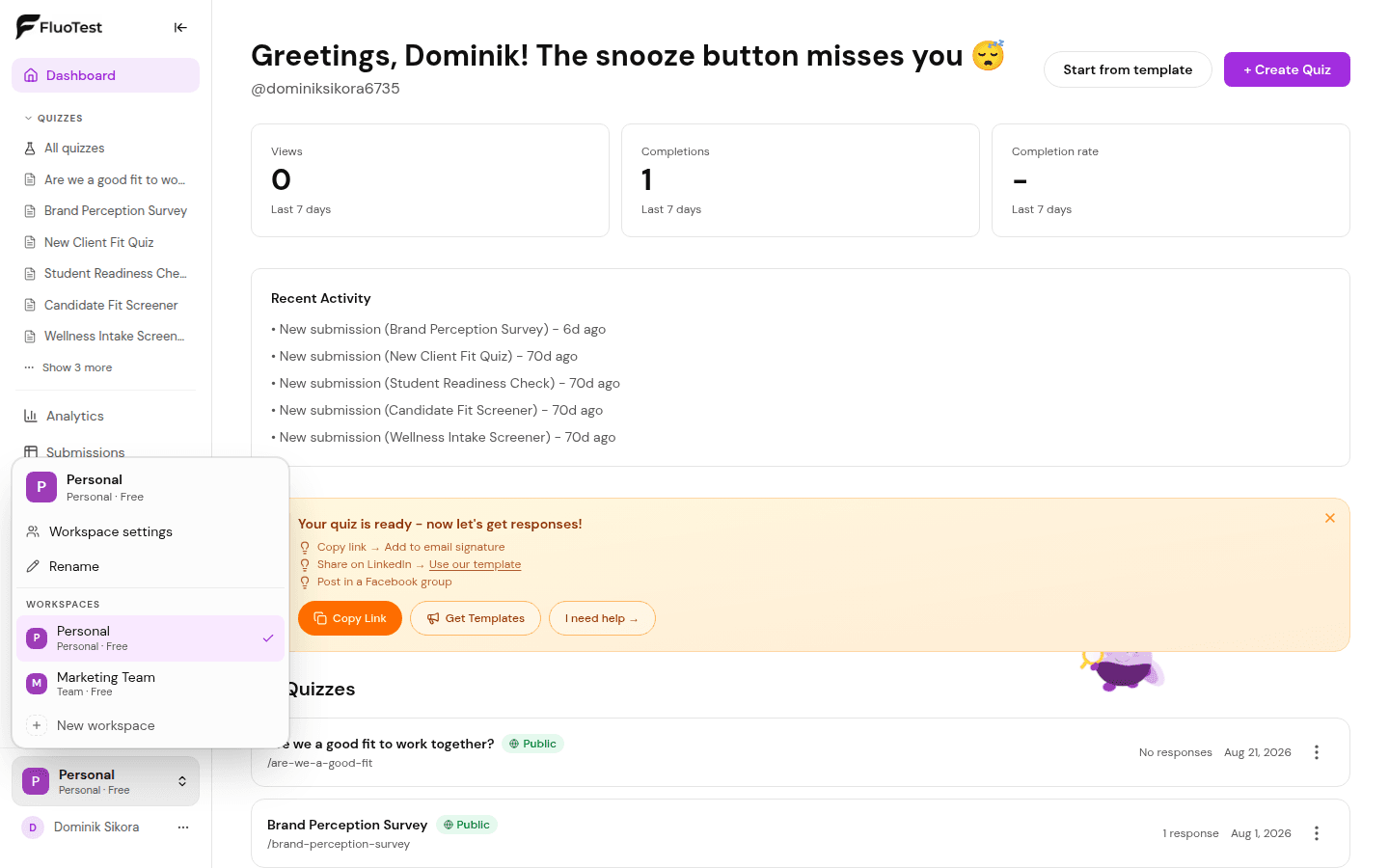
At the bottom of the sidebar you will see your current workspace, for example Personal with a Free label. Click it to see every workspace you belong to, plus actions for the one you are in, such as Rename.
2. Create a new workspace
Choose New workspace, give it a name and confirm. Name it after the client or brand so the list stays easy to read when you switch often.
3. Build the quiz inside it
While you are in the new workspace, a new quiz is created there. Dashboard, Submissions, Contacts and Analytics now show only this client's data, and the sidebar remembers the workspace you were in.
4. Move existing quizzes over
Already built a quiz in your personal workspace? Open the menu on its quiz card and choose Move to Team followed by the workspace name. Only the person who created the quiz can move it, and it leaves its folder because folders belong to a single workspace. Move to Personal brings it back.
5. Keep contacts apart
Contacts are built from the quiz responses in one workspace, and the tags, notes and saved segments you add belong to that workspace too. Respondents to one client's quizzes never show up in another client's Contacts page.
Try it:
Start freeWhy separate workspaces help
- -Each client's quizzes, folders and responses live in one place, so nothing gets mixed up when you are in a hurry
- -Contacts, tags and saved segments never blend across clients
- -You can rename a workspace or move quizzes between workspaces whenever you like
- -It costs nothing, so you can set up a workspace before you know whether a project goes ahead
- -If you upgrade to Pro later, your workspaces, quizzes and contacts stay exactly where they are
Who should use workspaces?
- -Freelancers and consultants who run quizzes for several clients
- -Agencies that want one tidy space per client account
- -Coaches with more than one brand or audience
- -Anyone who runs quizzes for different jobs, such as lead generation, hiring and onboarding, and wants them kept apart
Frequently Asked Questions
Is creating a workspace really free?
Yes. Creating a workspace does not require Pro. Quizzes and responses are unlimited on the free plan, so extra workspaces do not use up an allowance.
Can I invite a client or teammate into a free workspace?
No. Inviting members is a Pro feature. On the free plan a workspace is a private space for your own work. If a client needs their results, you can export them as CSV and send the file, or upgrade to Pro and invite them.
Do free plan limits reset when I create a new workspace?
There is nothing to reset. The free plan has no cap on quizzes or responses, and Pro status belongs to your account, not to a single workspace. A workspace is a way to organize your work, not a separate allowance.
Can I move a quiz to a different workspace later?
Yes. Open the quiz's menu and choose Move to Team followed by the workspace name, or Move to Personal to bring it back. You need to be the person who created the quiz, and it leaves its folder because folders belong to one workspace.
Do contacts carry across workspaces?
No. Contacts are built from the quiz responses in one workspace, and tags, notes and saved segments belong to that workspace as well. If the same person answers quizzes in two workspaces, they appear in each one.
Can I delete a workspace?
Yes, from the same switcher, except your personal workspace, which is permanent. Deleting a workspace removes its folders and contacts, and the quizzes themselves are kept.
Set up your first client workspace
FluoTest is free. No credit card required.
What you get on the free plan:
- - Unlimited quizzes and responses
- - A separate workspace for each client or brand
- - Score tiers, conditional branching and integrations
- - CSV export of every result
Questions? Read our pricing page or browse quiz templates.