Aangepaste berichten per scorelaag
Schrijf een aangepast bericht voor elke scorelaag zodat elke respondent een antwoord krijgt dat past bij zijn resultaat.
- 1
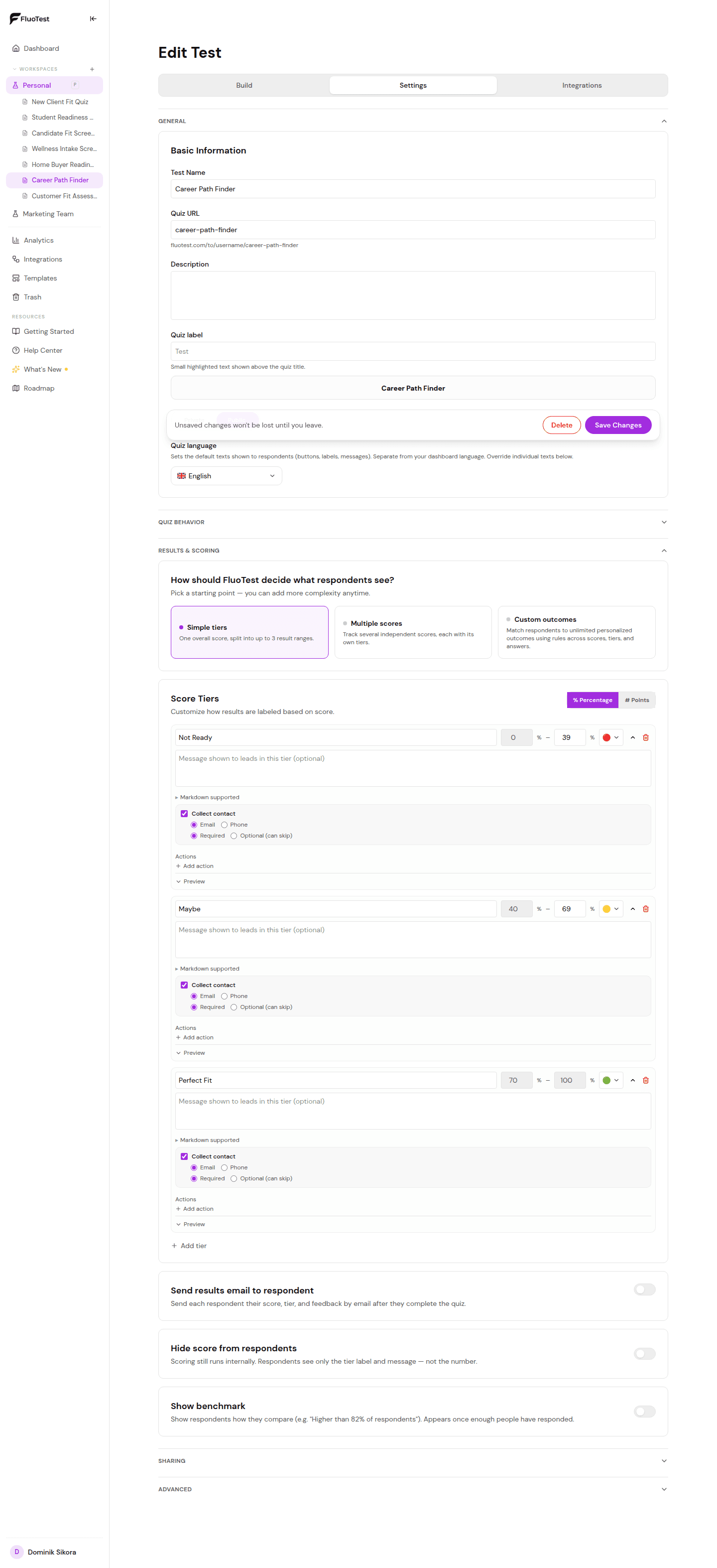
Open je quizbuilder, vouw "Resultaten & scoren" uit, kies "Eenvoudige niveaus" en scroll naar de lagenlijst.
- 2
Klik op een laag om deze uit te vouwen.
- 3
Zoek het veld "Uitkomstbericht". Dit is wat respondenten zien na het voltooien van de quiz.
- 4
Schrijf een bericht afgestemd op dat scoreniveau. Bijvoorbeeld voor een hoge laag: "Goed nieuws — je bent een perfecte match. Boek hieronder een gesprek." Voor een lage laag: "Bedankt voor het invullen van de quiz. Hier is een gratis resource die kan helpen."
- 5
Je kunt een call-to-action opnemen: een boekingslink, een doorverwijzings-URL of een e-mailinvulformulier.
- 6
Herhaal voor elke laag.
- 7
Sla op en test door de quiz op verschillende scoreniveaus te voltooien om elke uitkomst te zien.
Was dit nuttig?